· Prices checked · 8 min · Web design · Humza Sheikh
Website Migration SEO Checklist: 9 Steps From Our Move
A website migration SEO checklist in 9 steps, from Google's site-move guide and our own move: 30 of 30 old URLs still live, and the redirect chain we found.
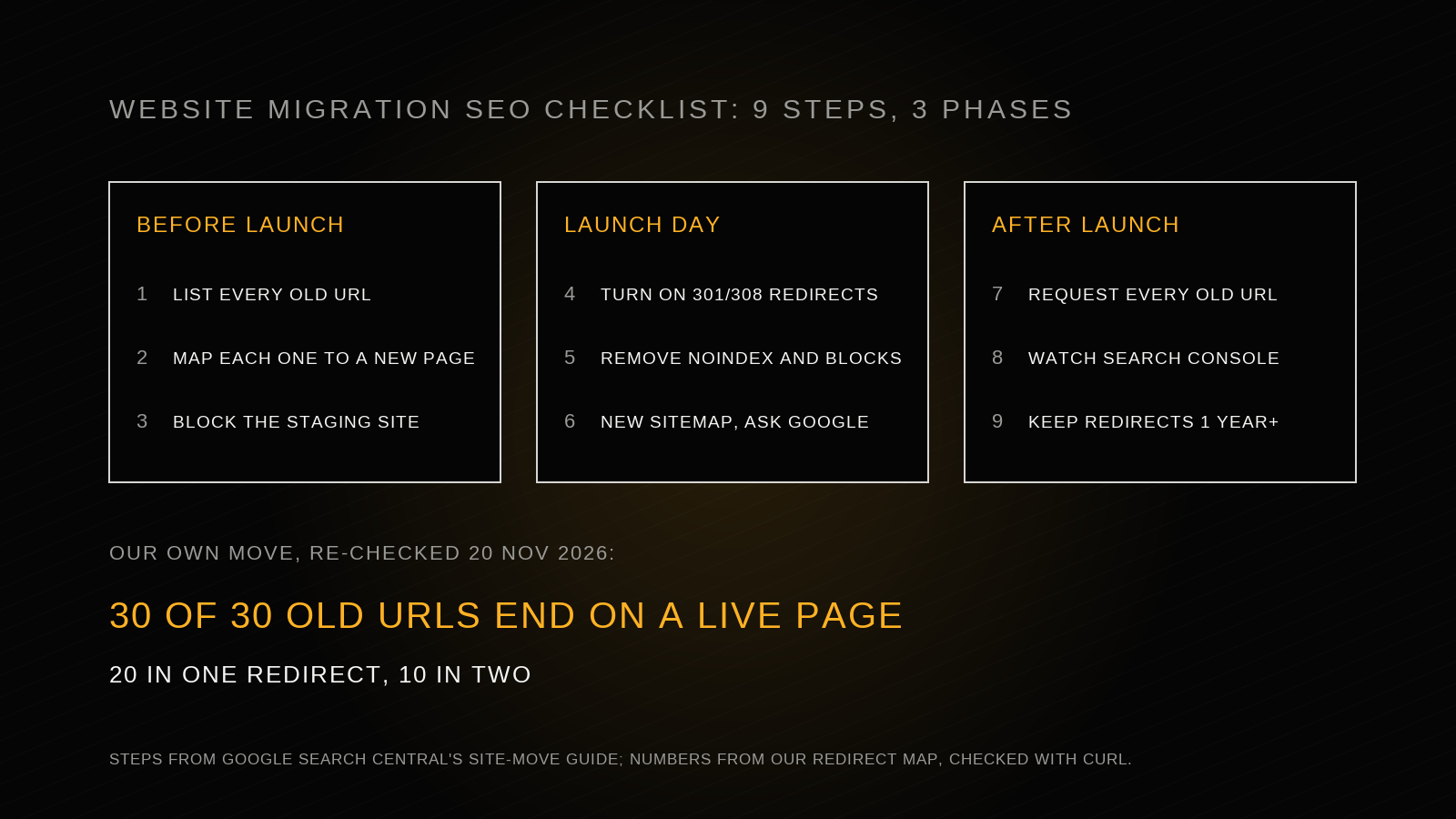
The short answer: a website migration keeps its search traffic when every old URL is mapped to a new page before launch, each one sends visitors and Google there with a permanent (301 or 308) redirect, and those redirects stay up for at least a year. That's what Google's own site-move guide asks for (Google Search Central). The checklist below turns it into nine steps in three phases.
We moved our own site, automization.io, in October 2026. On 20 November 2026 we requested every one of the 30 old URLs in our redirect map again. All 30 ended on a live page. But 10 of the 30 took two redirects to get there, which is the kind of chain Google advises against. Below is the checklist, our results and what that chain taught us.
What is the website migration SEO checklist?
Nine steps, in the order they happen:
| Phase | Step | What Google's guide says |
|---|---|---|
| Before launch | 1. List every old URL | The map starts from "the listing of old URLs" |
| Before launch | 2. Map each old URL to a new page | "Decide where each one should redirect to" |
| Before launch | 3. Block the staging site, and plan the live robots.txt | If you block crawling in development, "prepare what the robots.txt file should look like once the site move starts" |
| Launch day | 4. Turn on permanent server-side redirects | "We recommend that you use HTTP permanent redirects if possible, such as 301 and 308" |
| Launch day | 5. Remove migration blocks, fix canonicals and internal links | "Don't forget to remove any noindex or robots.txt blocks that were only needed for the migration" |
| Launch day | 6. Submit the new sitemap and ask Google to crawl | "Submit the new sitemap in Search Console" |
| After launch | 7. Request every old URL yourself | "Avoid chaining redirects" |
| After launch | 8. Watch Search Console | "Ideally the traffic on the old site will go down, while on the new site the traffic goes up" |
| After launch | 9. Keep the redirects | "Generally at least 1 year" |
Every quote is from Google's guide to site moves with URL changes, fetched on 20 November 2026.
What do you do before launch?
1. List every old URL. Not just the pages in the menu. Include old blog posts, landing pages from past campaigns and anything other sites link to. Your sitemap, a crawl of the live site and the pages report in Search Console between them catch most of it.
2. Map each old URL to its new page. One row per old address, with the page it should land on. Send each one to the closest match, not to the homepage. When we rebuilt automization.io, our map had 30 rows: the old www host, 12 old site pages, 15 renamed service pages and 2 retired articles. The retired articles redirect to the service page that covers the same ground, so even a page that no longer exists sends people somewhere useful.
3. Block the staging site, and plan the live robots.txt. A test copy of the new site shouldn't be indexed. Whatever you use to keep it out (a password, `noindex`, a robots.txt block) has to come off at launch, so write down now what the live robots.txt should say.
What happens on launch day?
4. Turn on permanent, server-side redirects. A permanent redirect tells Google to show the new page in its results; a temporary one keeps the old address showing (redirects and Google Search). Google ranks server-side redirects as the most likely to be read correctly, and says to use JavaScript redirects only if nothing else is possible.
5. Remove the migration blocks, and fix canonicals and internal links. Google asks for a self-referencing canonical tag on each new URL, and for internal links that point at the new addresses rather than relying on the redirects.
6. Submit the new sitemap and ask Google to crawl. Search Console's URL Inspection tool lets you request indexing for the pages that matter most. On our own site, when we sent that request the same day, Google crawled 11 of 11 new articles within 5 to 19 minutes of them going live (our indexing log). That's one site and a small sample, not a promise for yours. If you're moving to a new domain, also use the Change of Address tool. Google says it isn't needed for HTTP to HTTPS moves, switching between www and non-www, or moving paths within the same domain.
What do you check after launch?
7. Request every old URL yourself, and count the redirects. Don't stop at "the old page loads something". For each row in the map, record the first status code, the final status code, where it ended up and how many hops it took.
Here's ours, from 20 November 2026:
| What we checked | Result |
|---|---|
| Old URLs in our redirect map | 30 |
| Answered first with a permanent redirect (308) | 30 of 30 |
| Ended on a page answering 200 | 30 of 30 |
| Reached that page in one redirect | 20 |
| Reached it in two redirects | 10 |
The 10 two-step URLs are all old pages on the www host. The first redirect sends `www.automization.io/...` to the bare domain; the second sends that to the new page. Every one still works, and Google says Googlebot "can follow up to 10 hops". But the same guide says "we advise redirecting to the final destination directly", and that chains add delay for users. The fix is to point each old www address straight at its final page, in one rule.
Our first check, on 14 November, showed the same 10 two-step URLs. A check that only asks whether each old URL ends on a live page passes all 30. Counting the hops is what shows the chain.
8. Watch Search Console. Google expects some movement: visibility "may fluctuate temporarily during the move", and "a small to medium-sized website can take a few weeks for most pages to move, and larger sites take longer". Watch the old URLs drop out and the new ones take their place. A new URL that isn't indexed after that, or an old one that keeps showing, points back to a missing or wrong row in the map.
9. Keep the redirects. Google's guide says "Keep the redirects for as long as possible, generally at least 1 year." For domain moves made with the Change of Address tool, Search Console Help says to keep them for "at least 180 days", and longer if Google still sends traffic to the old addresses (Change of Address tool). The year is the safer number. Don't let a hosting change or a cleanup quietly delete them.
What does a migration quote usually leave out?
Steps 1, 2 and 7. Design and build are what every web design quote covers. The URL map and the redirect test after launch are the parts most likely to be missing, and they're what protects the traffic the old site already earns.
| Ask the agency | Why it matters |
|---|---|
| "Will you list and map every old URL before launch?" | Unmapped pages become 404s, and their links and rankings go with them |
| "Are the redirects permanent and server-side, straight to the final page?" | Temporary redirects keep the old address in Google; chains add delay |
| "Will you request every old URL after launch and send us the results?" | It's the only way to know the map works, and it's how we found our chain |
| "How long will the redirects stay up?" | Google's guide says at least a year |
Our web design service starts from $1,499, as a fixed project, and is guaranteed to go live by the agreed date and score 90+ on Google PageSpeed Insights, or we keep working free. Whoever builds your new site, ask for the URL map and the redirect test by name in the quote. If you're still deciding whether you need a new site at all, our article on website redesign cost covers that first.
Common questions
Will a website migration hurt my SEO?
It can, if old URLs break or redirect to the wrong place. Google says visibility may fluctuate for a while during any move. Mapping every old URL, using permanent redirects and keeping them for at least a year is how you keep that dip small and short.
Should I use a 301 or a 308 redirect?
Either. Google recommends permanent redirects "such as 301 and 308". Both tell Google to show the new page in its results. Our own site uses 308.
How long should I keep redirects after a migration?
Google's site-move guide says "generally at least 1 year". The Change of Address help page says at least 180 days, longer if Google still sends traffic to the old URLs.
Do I need the Change of Address tool?
Only if you're moving to a different domain or subdomain. Google says it isn't needed for HTTP to HTTPS, www to non-www, or path changes within the same domain.
How long does a website migration take to settle in Google?
Google says a small to medium-sized site can take a few weeks for most pages to move, and larger sites take longer. Asking Google to crawl the key pages on launch day helps them get picked up sooner.
Is a redirect chain a problem?
A short one still works: Googlebot follows up to 10 hops. But Google advises redirecting straight to the final page, because chains add delay and not every browser follows long ones. Ten of our 30 old URLs take two hops, and the fix is one rule per old address.
Moving or rebuilding your site?
Book a 15-minute call about our web design service. You'll get a fixed price and a launch date in writing, with the 90+ PageSpeed guarantee. Once it's live, our SEO service or website maintenance can keep watching Search Console for you.
Sources
The checklist steps and quotes are from Google Search Central, site moves with URL changes and redirects and Google Search, and from Search Console Help, Change of Address tool, all fetched 20 November 2026. Our redirect results are every row of our redirect map, requested with curl on 20 November 2026. The crawl times are from our indexing log. Our price and guarantee are from our web design page.